ChatGPT's most important privacy setting: how to decide for yourself what happens to your data
Privacy and data security are the big concerns of our time, especially when you work with AI like ChatGPT. Did you know there's a crucial setting that lets you decide whether your conversations are used to train the AI?
Lees in het Nederlands →Privacy and data security are the big concerns of our time, especially when you work with AI like ChatGPT. Did you know there's a crucial setting that lets you decide whether your conversations are used to train the AI? This setting gives you more control over your personal data than you might think.
In this article you'll find out why this option matters so much, how to change it easily, which plans offer it, and what it means in practice for your privacy. Because your data belongs to you – not to a machine.
Who can change this privacy setting?
This setting is available to all ChatGPT users, including those on the free plan. Whether you're a free user or a paying subscriber (such as ChatGPT Plus), you can choose whether your conversations may be used for model training.
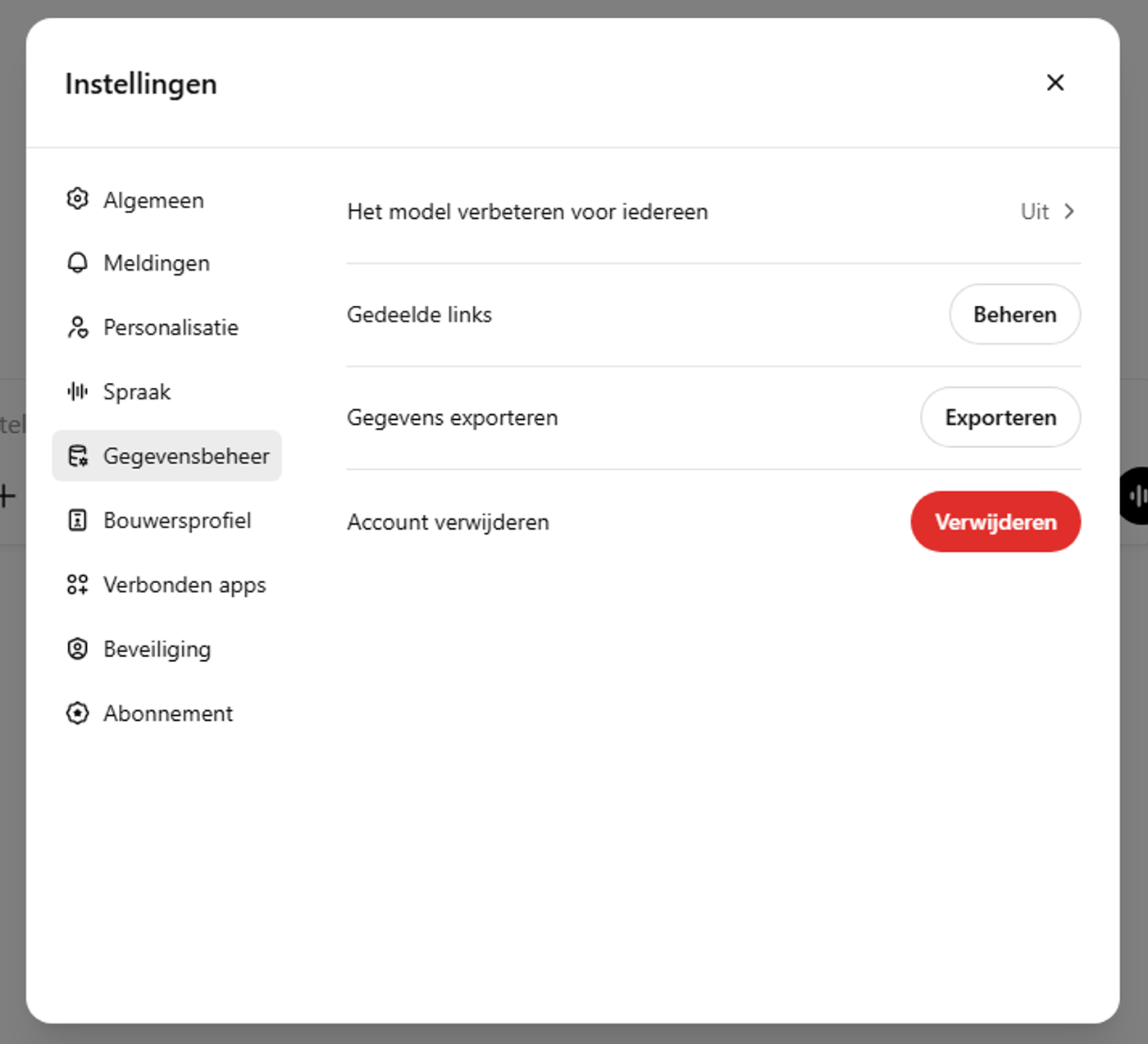
Is the setting on or off by default?
By default, the option ‘Improve the model for everyone’ is switched on. That means OpenAI may use your conversations to improve the AI, unless you switch this option off yourself.
How to stop ChatGPT using your conversations for training
Want your conversations to stay private and not be used to make the AI smarter? Then follow these simple steps:
- On the web version (logged in):
Click your profile icon at the top right > choose ‘Settings’ > go to ‘Data controls’ > switch off ‘Improve the model for everyone’.
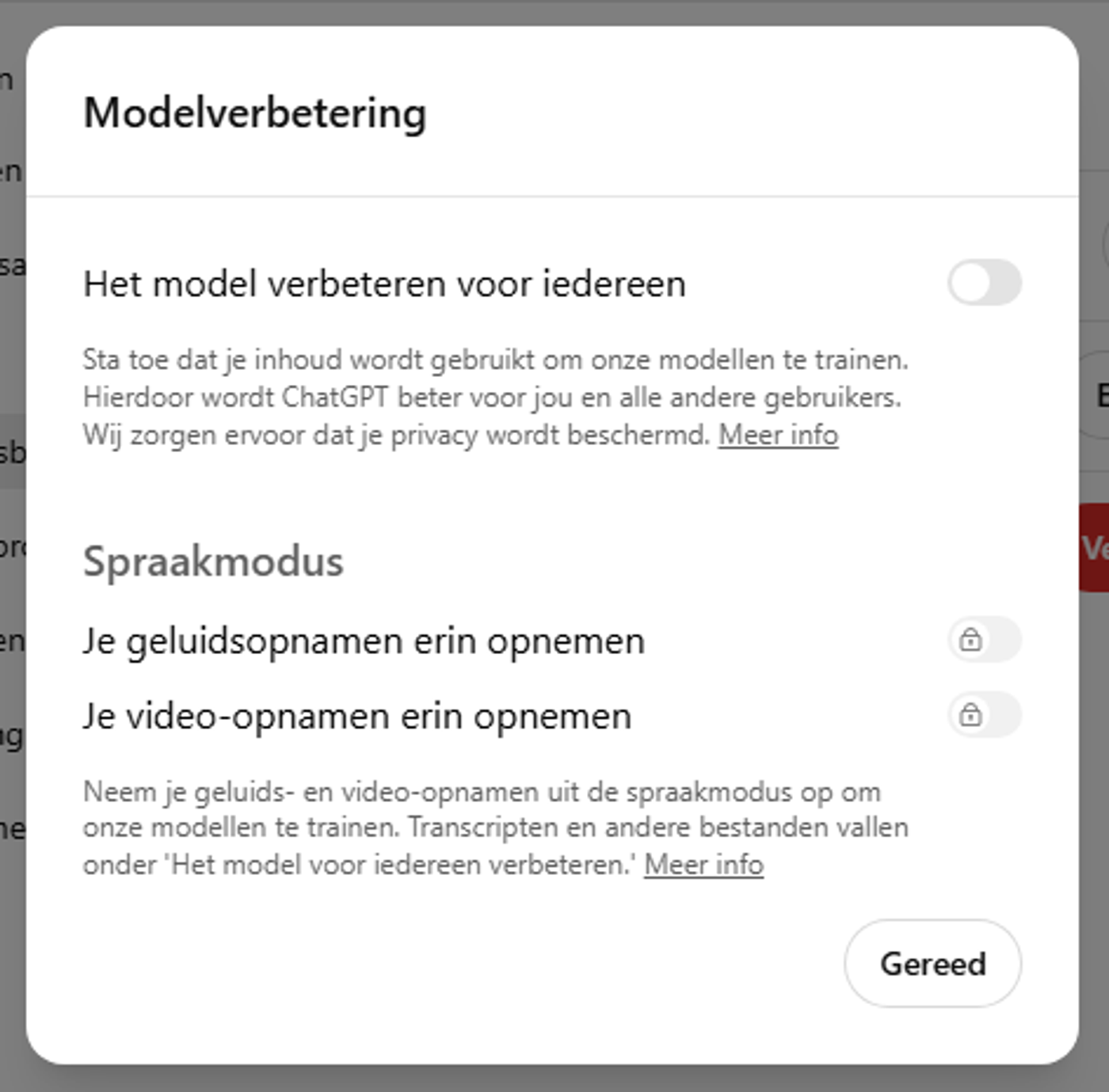
- On the mobile app:
Open the side menu > tap your profile > select ‘Data controls’ > switch off the ‘Improve the model for everyone’ option.
This setting syncs automatically, so you don't have to change it on every device separately.
What does this setting mean for your conversations?
If you switch off model training:
- Your conversations won't be used to improve ChatGPT.
- Your conversations will still be visible in your own history.
- Temporary chats are automatically deleted after 30 days and aren't saved in your history.
- No new memories (‘memory’) are built up based on those conversations.
Temporary chats: extra privacy, less storage
Temporary chats are a special option if you want even more privacy:
- They aren't saved in your history.
- They're automatically deleted after 30 days.
- They aren't used to train the AI.
That way you keep full control over what gets stored.
Can you change this at any time?
Yes, you can switch model training on or off at any time. There are no restrictions and you can change it as often as you like.
Did you ask customer support to opt you out in the past? Then that still applies to your account.
Extra options for business users
Are you part of a Team, Enterprise or Edu plan? Then extra data settings are available that let you control even more precisely what happens to your data. Check the official OpenAI Enterprise privacy page for details.
For the most recent and detailed information, you can always turn to the official OpenAI FAQ on data controls:
Data Controls FAQ – OpenAI Help Center
More from this zone

The Huang affair: what if the AI economy depends on one man?
Nvidia CEO Jensen Huang admitted an affair and the stock lost almost $200 billion in a day. What does that say about how much AI depends on one company and one man, and what should your business do about it?
Is my data safe when using the OpenAI API? Everything you need to know
If you use the OpenAI API, it's understandable that you're concerned about the security and privacy of your data. In this article I explain how OpenAI handles your data, what measures they take to protect it and how you…
How reinforcement learning is transforming the world of AI
Everyone has heard of machine learning at some point. It helps us predict trends, analyse data and automate processes.